
PickUp
Go to Reports -> Revenue -> PickUp
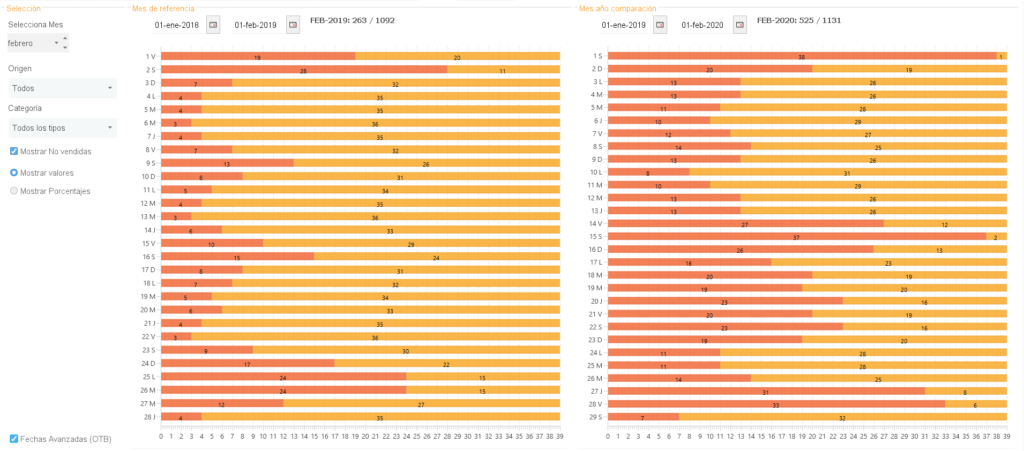
The PickUp is the evaluation of the increase or decrease of rooms reserved between two specific dates for a given period.
It helps analyze the daily behavior to know the amount of the sold rooms, future occupancy data, evolution of sales from one year to another, etc.
You can check the behavior of each segment (Reservations created by Avirato, coming from Booking, Expedia, Agoda, etc); analyze all the rooms or category by category; and see the availability and sales that are made by the different sales channels.
Finally, you can make an On the book (OTB) or the confirmed reservations between the range of dates that we establish.
In the left section, you will find the option to be selected:
Select Month: It will show you which month to display to be compared between 2019 and 2020.
Origin: It will show you choose to visualize by which means of segment the room has been sold
Category: It will show you view all categories or filter by category.
Activate Show Unsold: it will show you the value of unsold rooms.
Show Values: it will show both sold rooms and the unsold rooms by number (in case of having the check enabled.)
Show Percentages: It will show the number of rooms both sold and unsold by percentage (in case of being in check enabled.)
Advanced Dates (OTB): It will show you the possibility to choose a range of dates and to visualize in this range of dates the reservations obtained for the month that you are visualizing.
Reference month: it allows you to go to a previous month to see how many rooms you have sold for that month in the past year..
Comparison year/month: it allows you to go to a previous year to see how many rooms you have sold in the current year.
*Did not find what you are looking for? Send us an email with your suggestion by clicking here.