
Civil Guard Hostelry
Owners or managers of an accommodation establishment (hotel, apartments, hostels) must register their guests and keep updated the entry register in each property, in case of hotel chains.
The traveler’s register is mandatory for all accommodation establishments under the 4/2015 law of citizen protection on March, 30.
Who receives the travelers’ data in Spain?
If the accommodation is located in a place where there is no National Police station, the registration must be done with the Civil Guard, except for Catalunya where the authorities are Mossos D’esquadra and in the Basque Country the Ertzaintza.
Once the establishment is registered on the Webpol application for the sending of traveler’s data, you can automate the sending of this. (explained below)
How to collect the guests’ data for the travelers’ register?
With the document reader OCR AviScan: the document reader scans all kinds of documents and images, taking the guests’ data to the file.
1. Requisitos
It depends on the location of your establishment. If there is a National Police station, please visit this section.
The registration process in the Civil Guard Hostelry is very simple. The owner or manager properly identified must go to the nearest Civil Guard barrack with the original and copy of the paperwork listed below. You can check the nearest Civil Guard barracks here.
Identity document of the responsible.
Responsible declaration for the tourist activity, the same presented to the tourisms authorities.
Property management contract, simple note or deed indicating the power over the property.
The Civil Guard will assign a user and a password to access.
Important! If you have a user assigned previously, this step is not necessary.
2. Data entering
Once you have the user and password, acces to Settings> Avirato Integrations> Hostelry and INE > Hostelry> Settings > Hostelry List
Complete this section with the instruction given by the Civil Guard. Further information about the sending of files here.
In Type of Hostelry select Civil Guard.
Enter the user and password given by the Civil Guard.
Enter the corresponding number to the file to be sent.
After completing these instructions, you will be able to send automatically the travelers’ register to the Civil Guard.
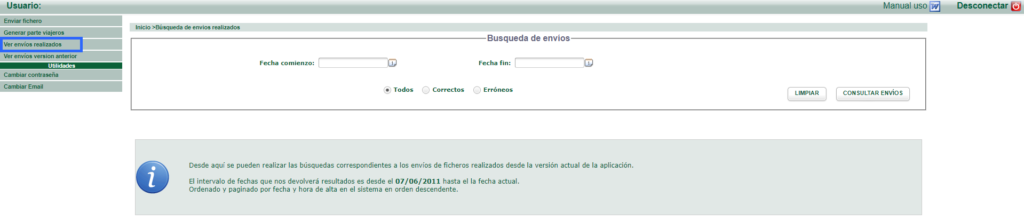
To check the registers was sent correctly, access the Civil Guard extranet and click on the See files sent button.
*Did not find what you are looking for? Send us an email with your suggestion by clicking here.